Gemini Prompt for Instagram DP: 32 Clean Profile Photo Ideas
Gemini prompt for Instagram DP ideas are perfect when you want a fresh profile picture without a photoshoot. Your DP is the first thing people see when they visit your profile, see your comment or get your message. A clear, bright and confident DP makes a strong first impression. With Gemini, you can turn a simple selfie into a clean, professional or creative profile photo in seconds.
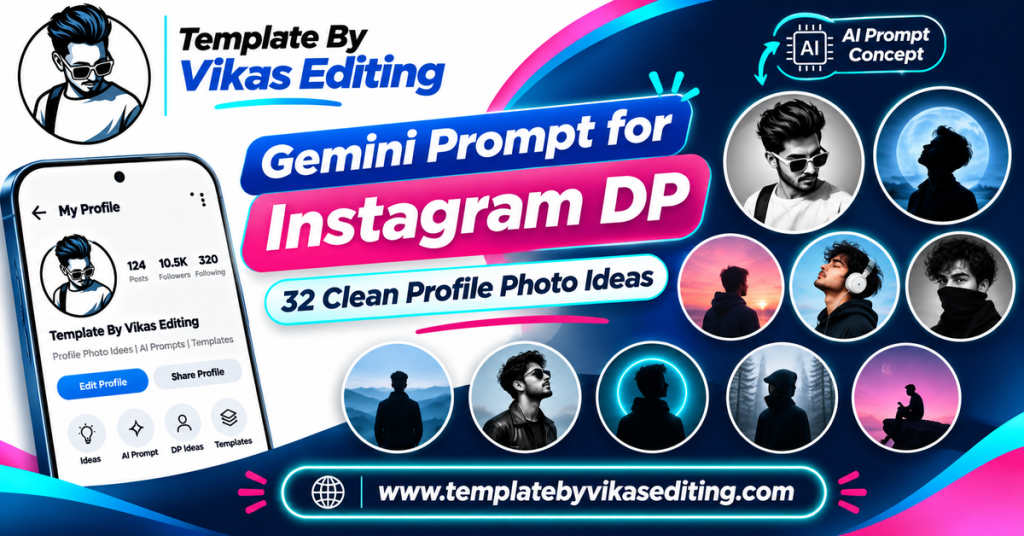
This page shares 32 DP prompts grouped into four sets: clean and simple DPs, professional and creator DPs, aesthetic and soft DPs, and creative and fun DPs. Every prompt is designed to look great in a small circle and keeps your face exactly the same. Each one sits in its own colour box with a copy button.
After the prompts, you will find simple steps, rules for a great DP, a table to choose the right style, tips for cropping, a guide to writing your own DP prompts, common mistakes and answers to frequent questions. Everything is in easy words. If you also need a work profile photo, the same tips work for LinkedIn.
Clean and Simple Gemini Prompt for Instagram DP Ideas
Clean DPs focus on your face with a simple background. They work for everyone and look good at any size.
1Gemini Prompt for Instagram DP Soft Grey Studio
2Pastel Colour Background DP
3Warm Beige Minimal DP
4Bright White Clean DP
5Soft Blur Outdoor DP
6Golden Hour Close DP
7Black Background Contrast DP
8Smiling Natural Light DP
Professional and Creator DP Prompts
These prompts give you a confident, polished look for business pages, creators and job profiles.
9Gemini Prompt for Instagram DP Professional Headshot
10Creator With Camera DP
11Editor at Desk DP
12Business Owner DP
13Podcast Host DP
14Fitness Coach DP
15Teacher or Tutor DP
16Artist Studio DP
Aesthetic and Soft DP Prompts
These prompts give you a gentle, pretty look that suits aesthetic feeds.
17Gemini Prompt for Instagram DP Flower Frame
18Fairy Light Bokeh DP
19Film Grain Aesthetic DP
20Rainy Window DP
21Sunset Silhouette Edge Light DP
22Cherry Blossom DP
23Coffee Cup Aesthetic DP
24Mirror Glow DP
Creative and Fun DP Prompts
These prompts make your DP stand out with a creative twist.
25Gemini Prompt for Instagram DP Anime Style
263D Avatar DP
27Pop Art Circle DP
28Pencil Sketch DP
29Neon Outline DP
30Watercolour DP
31Pixel Art DP
32Sticker Style DP
How to Use a Gemini Prompt for Instagram DP
Step 1: Take a Clear Selfie
Use soft daylight, face the camera and keep your face fully visible. Hold the phone at eye level.
Step 2: Open Gemini
Open the Gemini app or website and sign in.
Step 3: Upload Your Selfie
Tap the image icon and upload your photo.
Step 4: Paste the Prompt
Copy any prompt from the boxes above and paste it under your photo. Send it.
Step 5: Check the Face
Zoom in to check your eyes, smile and skin tone. Your DP should look like you.
Step 6: Download and Set as DP
Download in full quality, open Instagram, tap Edit Profile and change your profile photo.
Cropping for the Circle
Instagram shows your DP as a circle. Keep your face in the centre with a little space above the head.
Test the Small Size
Zoom out on your phone to see how the DP looks small. If your face is too small, crop closer.
Using the Same DP Everywhere
Use the same DP on Instagram, WhatsApp and other apps. It helps people recognise you across platforms.
Update Seasonally
Change your DP every few months or for big festivals. A fresh DP shows your profile is active.
Rules for a Great Instagram DP
Face First
Your face should fill around 60 percent of the circle. Faces that are too small are hard to recognise.
Simple Background
Plain or softly blurred backgrounds keep attention on you. Busy backgrounds look messy at small sizes.
Good Light
Bright, soft light makes faces clear and friendly. Avoid dark or harsh shadows.
Natural Expression
A soft smile looks friendly and approachable. Very serious or extreme expressions can feel cold.
Match Your Content
A creator DP should match the content. A fitness coach in gym clothes and an artist in a studio make sense instantly.
DP Styles Compared
| DP Style | Best For | Background | Mood |
|---|---|---|---|
| Clean and simple | Everyone | Plain or soft blur | Friendly |
| Professional and creator | Business and creators | Studio or work setting | Confident |
| Aesthetic and soft | Aesthetic feeds | Bokeh, flowers, film | Calm and pretty |
| Creative and fun | Fun and art pages | Bold or artistic | Playful |
How to Write Your Own Gemini Prompt for Instagram DP
Every gemini prompt for instagram dp on this page follows a simple pattern you can reuse.
Lock the Face
Start with “Use my uploaded photo as the exact face reference and keep my face the same.”
Choose the Framing
Say “head-and-shoulders portrait” or “close-up portrait” with a “centred face”.
Pick One Background
A solid colour, a soft blur, a studio or one simple setting.
Add Light and Expression
Soft front light, golden hour or window light, plus a soft smile or calm look.
End With the Frame Size
Always add “square 1:1 frame” for profile pictures.
Example You Can Try
“Keep my face the same. Create a head-and-shoulders portrait on a soft mint green background with soft front light. Gentle smile, centred face, realistic, square 1:1.” Change only the background colour to make many versions.
Best Selfies for DP Edits
Your starting selfie makes a big difference. Take it in daylight near a window. Hold the phone slightly above eye level for a flattering angle. Keep your hair away from your eyes and remove caps or sunglasses. Turn off beauty mode so your real skin texture stays. A clean selfie helps every gemini prompt for instagram dp give a sharp and natural result.
Tips for a Standout DP
Use a Signature Colour
Pick one background colour and keep it for future DPs. It becomes part of your brand.
Keep It Recognisable
Even creative styles like anime or 3D should keep your main features. Friends should still know it is you.
Avoid Text in the DP
Small text is unreadable in a circle. Keep the DP image-only.
Keep Your Shoulders in Frame
A head-and-shoulders crop looks balanced and natural in the circle. Very tight crops that cut the chin or forehead feel uncomfortable.
Smile Softly
A soft, natural smile looks warm in a tiny circle and makes your profile feel friendly to new visitors.
Look at the Camera
Eyes looking straight at the camera create a sense of connection. Viewers feel you are talking to them.
Choose Colours That Pop on Dark Mode
Many people use Instagram in dark mode. A light or colourful background stands out better than a black one in a dark app.
Match Your Highlights
Use similar colours in your story highlight covers. It makes your profile look neat and planned.
DP Ideas for Different Platforms
Each platform shows your profile photo a little differently. A good gemini prompt for instagram dp can be adjusted slightly for each one.
A friendly, bright, centred face works best. Aesthetic or creative styles also suit Instagram well.
WhatsApp DPs are seen by family and friends. Clean, simple and warm portraits feel right here.
LinkedIn and Job Profiles
Use the Professional Headshot prompt with a plain background and smart clothes. Avoid creative or fun styles for job profiles.
YouTube Channel
A clear face or a simple creator portrait helps viewers trust your channel. If you have a logo, you can use it instead.
Gaming and Fun Profiles
Anime, pixel art and 3D avatar DPs fit gaming and fun pages perfectly.
One Face, Many Versions
Make three versions from the same selfie: clean, professional and creative. Then use the right one for each platform.
Festival DP Ideas
Changing your DP for festivals is a fun way to celebrate. For Diwali, try a warm portrait with soft diya light. For Christmas, add fairy light bokeh behind you. For Holi, a bright colourful background works well. For New Year, gold and silver tones feel festive. Keep the face clear and centred, and switch back to your main DP after the festival.
Common Mistakes and Fixes
Face Too Small in the Circle
Ask for a “close-up portrait” or crop closer before setting it as your DP.
Skin Tone Changed
Add “keep my exact skin tone” right after the face-lock line.
Background Too Busy
Ask for a “plain” or “softly blurred” background.
DP Looks Too Edited
Add “natural skin texture, realistic” and avoid very strong effects.
Why Your DP Matters More Than You Think
Your DP appears next to every comment, message, story and like you share. People decide in a second whether to follow, reply or trust a profile, and the DP plays a big part in that choice. A clear, friendly face builds trust. A blurry or dark DP can make a profile look inactive or fake.
First Impressions Count
New visitors often look at your DP before your posts. A good gemini prompt for instagram dp result helps you look approachable and real.
It Builds Recognition
When you keep a similar DP style for a long time, people start to recognise you instantly in their feed and comments.
Use Your New DP Across Your Brand
Pair your new DP with a matching logo from our Vikas Editing logo prompt guide and fresh feed photos from our Gemini prompt for boys collection or Gemini prompt for girls collection. For trending looks, see our viral edit prompt list.
Frequently Asked Questions
What is the best Gemini prompt for an Instagram DP?
For most people, the Soft Grey Studio and Smiling Natural Light prompts give clean, friendly DPs. Creators may prefer the Professional Headshot or Creator With Camera prompts.
What size should an Instagram DP be?
Use a square image. Instagram shows it as a small circle, so keep your face in the centre.
Will Gemini keep my face the same?
Yes, in most cases, if you use a clear selfie and keep the face-lock line in the prompt.
Can I use an anime or 3D DP?
Yes. Creative DPs are fun, but keep your main features so people still recognise you.
How often should I change my DP?
Every few months, or for special occasions like festivals, is a good rhythm.
Are these DP prompts free?
Yes. All prompts are free, and Gemini offers free photo editing with daily limits.
Conclusion
A gemini prompt for instagram dp gives you a fresh, clear and confident profile photo in seconds. Choose a clean, professional, aesthetic or creative style, start with a good selfie and paste the prompt into Gemini. Keep your face in the centre, use a simple background and always check the small circle view. With the right DP, every comment, message and profile visit starts with a great first impression.